If you are a Director of Operations or CFO in a medium-sized company, this scene probably sounds familiar to you: an Excel file that started out as a simple tracking record now has 50 tabs, is modified by more than 10 people simultaneously and no one is sure what the definitive version is anymore. Every week there is at least one meeting dedicated exclusively to reconciling data that should work out on its own.
It seems that you are not the only one or the only one. According to data from consulting firms specializing in business process automation, more than 70% of medium-sized European companies continue to manage critical business processes in spreadsheets (BPM Partners, 2023 BPM pulse survey & BPM Partners). And the problem is not at all that Excel is a bad tool: it was simply designed to analyze data, not to orchestrate operations.
This guide aims to help you understand when and how to make the transition to automated workflows, without technicalities and to convey to you that, with a specific and well-executed plan, it can be implemented in a range of up to 4 to 6 weeks without paralyzing your current operation.
The real problem: when Excel becomes an operational obstacle
Excel has a scaling problem. It works perfectly for 3 people managing 200 records, but it starts to fail when 15 people touch the same file with 5,000 records. And it completely collapses when you try to make it the official record system for a critical business process.
The real cost of maintaining processes in Excel isn't just wasted time: you have to take into account the cost of errors.
In medium-sized companies with a turnover between €10 M and €100 M, failures resulting from manual management in spreadsheets can generate estimated losses of between €15,000 and €50,000 per year. This includes billing errors, duplicate orders, outdated customer data, and decisions made about incorrect information.
Key fact: A study by EUSprig (European Spreadsheet Risks Interest Group) points out that 88% of spreadsheets with more than 150 rows contain at least one significant error. In business environments, that percentage can reach 94% when multiple users edit the same file.
The most common symptoms of companies that consult us are varied: reports that take hours to prepare because you have to manually consolidate data from various sources; approval processes that depend on someone remembering to send an email; duplicate or contradictory customer data in different departments; and a general feeling that “no one knows exactly what is going on” in real time.
In our opinion, the problem is not the tool itself. The problem is using the wrong tool for the wrong job.
Excel is an extraordinary static analysis. But an automated workflow is a dynamic operation.
They are different things.
The 5 signs that it's time for a change
Not all companies need to migrate their processes at the same time. There are clear signs that the critical threshold has arrived and that maintaining the Status Quo it has a higher cost than the investment of changing.
1. Maintaining the archive is already a part-time job
When a person spends more than 5 hours a week “maintaining Excel” —updating formulas, cleaning data, resolving version conflicts, and preparing the summary for the week—they are doing work that should ideally be automated.
If we assume a cost of 35 €/hour for 50 weeks a year, this maintenance could mean up to 8,750€ per year in time for a qualified person. And that's without taking into account the errors.
2. Data is out of sync between departments
If Sales has one version of the pipeline, Finance has another, and Operations works with a third, the problem in question is not one of communication, but of data architecture. A single source of truth is needed that all departments can consult and update in real time.
3. Approval processes rely on emails
If to approve a purchase, authorize a return or validate a contract, the process involves sending an email, waiting for a response, forwarding if there is no response within 48 hours and finally updating Excel manually, a process without traceability is being managed. Any internal or external audit will find gaps in the record.
4. The company can't scale because processes don't scale
If to take on more volume you need to hire more people just to do administrative tasks, you are facing a clear sign that the process depends too much on manual work. When processes are well designed, growth does not require a duplication of structure: it allows us to manage more without increasing costs at the same rate.
5. Training new employees takes longer than expected
If the On Boarding of a new person includes several sessions dedicated exclusively to understanding spreadsheets, formulas and versions, you are probably not training in the process, but in how to survive the system.
The more complex Excel is, the more dependent it generates on accumulated internal knowledge. And that's not something scalable.
A well-designed system should allow someone new to understand the workflow relatively quickly, without needing weeks to figure out how it works.
What is an automated workflow, without technicalities
An automated workflow can be described as a series of steps that the system automatically executes when an event occurs, without a person having to remember to do so, copy data from one site to another, or send warning emails.
The fundamental difference with Excel is that Excel stores information. A workflow orchestrates actions.
When a customer submits an order, a workflow can: register the order in the system, notify the warehouse, block the corresponding stock, generate the preliminary invoice, send confirmation to the customer and update the sales dashboard — all in less than 30 seconds and without anyone touching a keyboard.
Practical analogy: If Excel is like a filing cabinet where you keep documents in order, a workflow can be like a very organized employee who, when a new document arrives, automatically archives it in the right place, informs who it corresponds to, updates the general record and schedules the necessary follow-up tasks.
The basic components of a modern workflow could be summarized as follows: a trigger (trigger), which is the event that starts the process; Some actions, which are the steps that are executed automatically; and Some conditions, which determine what actions are executed based on the state of the data.
Most common types of workflows in medium-sized companies
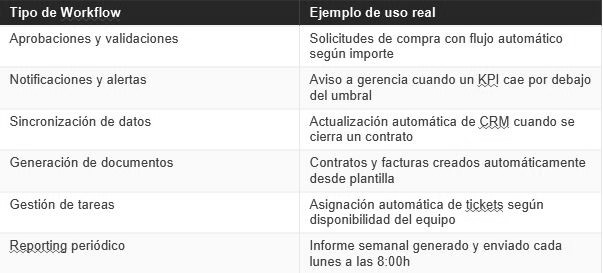
The important thing is to understand that these workflows do not necessarily require custom developments or large investments in infrastructure. Today there are automation tools - many under no-code or low-code approaches - that allow us to design and deploy these flows through visual configurations and predefined rules, in a matter of weeks, not months.
The difference between automation and digitalization
Digitalization, in a very simple way, is moving from paper or Excel to having the data in a digital system. Automation is that this digital system acts on its own when appropriate. Many companies have digitized (they have CRM, ERP, accounting system) but they haven't automated: they still need people to copy data from one system to another, generate reports manually or activate processes when an event occurs.
Process automation is the step that turns digitalization into real productivity. It's the difference between having the data accessible and having the data working for you.
The 5 steps that enable a transition in 4-6 weeks
Of course, each company starts from a different situation: volume, complexity, internal culture and existing systems directly influence the pace of the project. What follows is obviously not a closed formula, but a realistic simulation of how the transition could be addressed in a medium-sized company with a process of medium complexity, with the no-code approach that we propose.
One of the most common mistakes in automation projects is wanting to migrate everything all at once. In most cases, the most practical approach is to start with the most painful process, validate it, and expand from there.
Here's an example of a work plan:
1) Mapping and Diagnostics (Week 1)
Before you automate anything, you need to understand exactly how the current process works, including exceptions, informal steps, and real bottlenecks. This may involve a week of interviews with the people who execute the process on a daily basis, not just with their managers.
El Output ideal for this phase would be a process map that documents: each step of the current process, who executes it, how long it takes, what tools they use and what happens when something fails. This step is where it is very commonly discovered that the actual process is quite different from the documented process, if there is documentation in this regard.
2) Prioritization by impact and effort (Week 1-2)
With the process map in hand, identify the 2-3 steps that generate the most friction. Don't try to automate everything all at once. Use an impact/effort matrix to prioritize: high execution frequency, high cost in time or errors, and a relatively standardized process (few exceptions).
The process with the highest score in these three criteria may be the best candidate for the first workflow.
In the projects we accompany, this phase is key: good prioritization avoids investing time and budget in automations that generate little real return.
3) Design and Construction (Week 2-4)
With the process selected and validated, the design and construction phase of the workflow begins.
In our case, we usually approach this type of project with a flexible architecture based on no-code/low-code tools: an example could be: WeWeb for the user interface, Supabase as a database and n8n for the automation of flows.
Why this combination?
WeWeb allows you to create clear interfaces adapted to the real work process, without relying on traditional front-end developments.
Supabase provides a robust and scalable database that acts as a single source of truth.
n8n facilitates automation and integration with other systems (ERP, CRM, financial tools), connecting the different steps of the process without complex programming.
This architecture is not the only possible one, but in medium-sized companies it usually offers a good balance between speed of implementation, flexibility and capacity for future evolution. The development of a standard workflow can take between 2 and 4 weeks, depending on the complexity of the process and the necessary integrations.
During this phase, we consider it essential to involve end users in interim reviews (here we bring to the table the importance of co-designing with users). From our perspective, the classic mistake is to build something technically flawless that then doesn't fit with the way people actually work.
4) Controlled pilot (Week 4-5)
Before permanently replacing Excel, it is advisable to launch the new workflow in parallel with a small group of users. It usually works well to select 3-5 influential people within the team - not necessarily the most senior, but those whose opinion has real weight, since their adoption facilitates that of the rest.
During the pilot, Excel can be kept as a backup. The objective is not to force change, but to make the users themselves perceive that the new system simplifies their work.
Step 5: Migration and Shutdown (Week 5-6)
Once the pilot has been validated, we recommend planning the migration of historical data and defining a clear “sunset” date for Excel. In our experience, formalizing the closure is important: if both systems live together indefinitely, it is common for the team to return to the most familiar one in the event of any questions.
A short period of intensive support after migration is often sufficient to resolve most initial issues and consolidate adoption.
NOTE ON DEADLINES
As a guideline, a medium-complexity workflow in a medium-sized company could be operational within approximately 4 to 6 weeks from the start of the project.
When there are multiple complex integrations — such as legacy ERP, banking systems or external APIs — the deadline could be extended to 8-10 weeks, depending on the technical context.
Beyond the exact figure, any proposal that promises significantly faster results or excessively long deadlines should be analyzed in detail, since both extremes usually indicate assumptions that have not been properly validated.
5 Common Mistakes (and How to Avoid Them)
Having accompanied dozens of companies in automation processes has allowed us to identify patterns of failure that are frequently repeated:
1. Automate the wrong process
The most common mistake is to digitize bad practices. If the current process is inefficient, automating it will only make the inefficiency happen faster. Before automating, it is important to simplify.
2. Leave the decision solely in the hands of IT
Projects that don't have a Champion operationals—someone in the business with authority and a real will to drive change—are much more likely to stagnate. Automation is a business project with a technological impact, not the other way around.
3. Underestimating change management
The technical part is rarely the main obstacle. A significant part of success depends on adoption. Without clear communication, adequate training and support, even the best technical solution can fail.
4. Try to Perfect Before Launching
The “when everything is ready we present it” approach usually results in projects that last indefinitely. It's more efficient to release a functional version, validate with real users and iteratively improve.
5. Don't Measure Before and After
Without starting metrics - time per process, error rate, cost per transaction - it is difficult to demonstrate the real impact of the project. Defining a baseline before starting is key to evaluating results.
Next steps
If you recognize your company in any of the symptoms described in this guide, the recommended first step is to carry out a structured diagnosis of current processes. The objective is not to decide on a purchase, but to understand with data where the greatest potential for improvement is and what impact it would have to address it.
At Yellow Glasses, we accompany this initial analysis to help you measure the potential return and define a realistic plan before making any decision.
- FSN (Financial Systems Network) Reported that the 71% of organizations rely on spreadsheets to collect data across most of their business units. Accounting Today
Heading
Lorem ipsum dolor sit amet, consectetur adipiscing elit. Suspendisse varius enim in eros elementum tristique. Duis cursus, mi quis viverra ornare, eros dolor interdum nulla, ut commodo diam libero vitae erat. Aenean faucibus nibh et justo cursus id rutrum lorem imperdiet. Nunc ut sem vitae risus tristique posuere.

Artículos destacados
Explora nuestros últimos artículos y tendencias.