All three platforms have a landing page designed to convince you that they are the right choice. Zapier says it has more than 8,000 integrations. Make boasts its visual editor. n8n talks about data sovereignty and open source. All three of them are right. The problem is that none of them tell you when their tool is the wrong one for your company.
This article is not a feature review. It is a comparison built on four real profiles of medium-sized Spanish companies —between 50 and 500 employees,1 the range where the automation decision has the greatest proportional impact on results—with a reasoned recommendation for each one, the monthly cost verified as of March 2026 and the decision criteria that suppliers prefer not to calculate on your own.
NOTE: Methodological notice: the prices mentioned in this article correspond to the plans published on the official pages of each platform in March 2026. All plans are subject to change. The actual cost depends on the volume of operations and the technical profile of the team. None of the companies mentioned have participated in the development of this content.
What each platform does (without marketing copy)
Zapier, Make and n8n do the same thing in general terms: they connect applications and automate workflows without the need for conventional code. The difference is in how they do it, who they are designed for and what happens when the flow gets complicated.
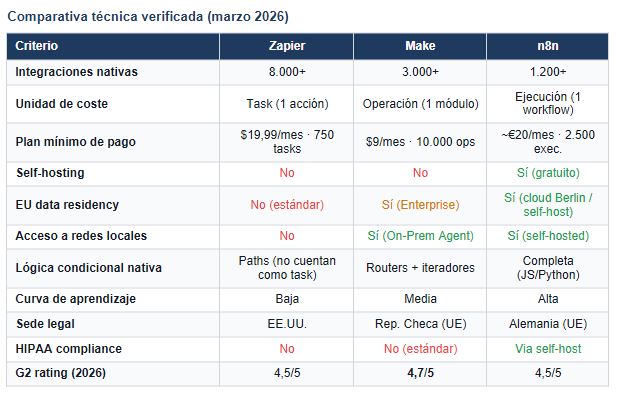
Zapier has been operating since 2011 and is the platform with the largest ecosystem of integrations in the market: more than 8,000 pluggable applications.3 Its model is the easiest to adopt: each automation is a linear sequence of steps (Zap) that triggers when an event occurs in one application and executes one or more actions in another. The cost unit is the task, that is, each action executed. The Professional plan starts at $19.99 per month for 750 tasks. From there, the cost escalates rapidly: for 2,000 tasks per month, the Team plan costs $69. For serious business volumes, the jump to the Enterprise plan involves personalized pricing.
Make —formerly Integromat, based in Prague— operates with a visual canvas scenario model that allows for native bifurcations, iterators, aggregators and error management. Its more than 3,000 integrations are sufficient for most mid-market use cases.8 The unit of cost is the operation (each module executed within a scenario). The Core plan starts at $9 per month for 10,000 transactions — a volume that in Zapier would be equivalent to a considerably more expensive plan. Your credits don't expire, eliminating the problem of unconsumed transactions at the end of the month. In the Enterprise plan, Make incorporates EU data residency and On-Prem Agent to access local networks without modifying corporate firewalls.4
n8n is the only one of the three platforms that can be installed on the company's own infrastructure (self-hosted) without a license fee. Its Community version is open source and free, with unlimited executions and workflows.5 Its visual editor allows you to create complex flows with complete JavaScript or Python code nodes, making it the most technically powerful option. It has more than 1,200 native integrations and, in the cloud version, the Starter plan starts at approximately 20—24 euros per month for 2,500 executions (where one execution is equivalent to a complete workflow, regardless of how many nodes it has). n8n is based in Berlin and its cloud operates on European infrastructure by default. In 2025, it announced a partnership agreement with SAP, relevant to companies with ERP from that manufacturer.
The criteria that suppliers prefer you not to calculate
Comparing features is the easiest to do and the least useful. What determines if an automation platform is right for your company isn't the number of integrations — 50 covers 95% of mid-market use cases — but five factors that vendors rarely quantify on their pricing pages.
1. The actual 12-month cost, not the cover price
The cover price of Zapier Professional ($19.99 for 750 tasks per month) is the entry point, not the operating cost. A company that automates three moderately active processes—billing, CRM notifications, and inventory synchronization—can exceed 5,000 monthly tasks in weeks. The Team plan at that volume costs $69 per month, and the next step is personalized pricing. Make, with 10,000 operations at $9 per month in the Core plan, has a significantly lower cost per operation for complex flows.11 n8n self-hosted, installed on its own server or on a VPS of 20—40 euros per month, eliminates the cost of a license completely for teams with the technical capacity to maintain it.
2. The real technical profile of the team that will maintain it
None of the three platforms require programming knowledge to automate simple flows. The problem appears when something fails or when the flow needs logic that exceeds the predefined templates. Zapier is designed so that anyone with basic technical curiosity can figure it out. Make requires understanding concepts such as iterators, aggregators and data structures. n8n assumes that someone on the team can read and write JSON, understand webhooks and, in the case of self-hosting, manage Docker and PostgreSQL.12 Oversizing the tool with respect to the team's profile generates silent technical debt: automations that no one understands, that no one can modify and that eventually fail without anyone knowing why.
3. Data residency and the GDPR
When an automation processes customer, employee or patient data, the jurisdiction where that data is processed and stored has direct legal implications under the General Data Protection Regulation.10 Zapier operates from servers in the United States and does not offer EU data residency in its standard plans. Make offers EU data residency in its Enterprise plan and is based in the Czech Republic, within the European Union. n8n, based in Berlin, operates its cloud on European infrastructure by default; in its self-hosted version, the data does not leave the company's infrastructure under any circumstances. For sectors such as healthcare, insurance or banking, this criterion may not be optional.
4. The ability to connect to internal systems (ERP, local databases)
None of the three platforms can connect directly to an SAP ERP without an exposed REST API or intermediate middleware.6 The difference is in how they manage access to local networks. Make offers the On-Prem Agent, a component that can be installed within the corporate network that allows Make scenarios to access internal systems without opening ports to the outside. n8n self-hosted solves this problem structurally: being installed within its own network, it can access any database or internal system with local network connectivity. Zapier, with no local agent available in standard plans, requires that the systems to be integrated have public APIs accessible from the internet.
5. Long-term vendor lock-in
Workflows built in Zapier or Make are not exportable in a standard format. If the company decides to change platforms, the workflows must be rebuilt from scratch. n8n exports its flows in standard JSON and includes native integration with Git for versioning and portabilizing automations. This difference is marginal when you have ten active flows. It becomes a critical factor when you have two hundred and the company needs to audit them, replicate them in test environments or migrate them.
Four medium-sized Spanish company profiles: a recommendation for each one
The above comparison defines the decision space. What follows are four profiles built on the basis of medium-sized Spanish company patterns in the sectors where automation has the greatest impact: hospitality, distribution, professional services and regulated industry. Each profile includes the recommended tool, the estimated monthly cost and the reasoning behind the choice.
Profile A. The company without an internal technical profile
50—150 employees · Google Workspace · No dedicated developer · Early automations
Recommended tool:
Zapier Professional/Team
Estimated cost: Starting at $19.99/month · Scalable depending on volume
Zapier is the only one of the three that can be configured, maintained and extended by someone without a technical profile. Its step-by-step editor, template library and support are designed for this scenario. The cost is higher per operation, but the total cost considering configuration and maintenance time is often lower in organizations without an internal developer. The main risk is the escalation of costs if the volume of automations grows rapidly.
Profile B. The company with a growing technical capacity and volume
100—300 employees · CRM + ERP in the cloud · 1 internal technical or IT profile · 10—50 active automations
Recommended tool:
Make Pro/Teams
Estimated cost: From $19—29/month · 10,000—25,000 operations
Make offers the best cost-functionality ratio for this profile. With a single technical profile capable of understanding the visual editor, the company has access to complex conditional logic, native error management and On-Prem Agent to connect to local systems. The cost per operation is significantly lower than that of Zapier for complex flows. EU data residency at Enterprise adds compliance without the need for self-hosting. It's the natural leap for teams that have exhausted Zapier's capabilities or want to better control the cost.
Profile C. The company in a regulated sector with a data sovereignty requirement
100—500 employees · Healthcare, Insurance, Banking, Education · Customer or Patient Data · Strict GDPR
Recommended tool:
n8n (self-hosted)
Estimated cost: ~20—40 €/month in VPS infrastructure · License: 0€
For organizations where customer, employee, or patient data cannot be processed outside their own infrastructure, n8n self-hosted is the only option of the three that guarantees total sovereignty. When installed on the company's server, the data does not leave the company at any time. The learning curve is steep and requires technical expertise for installation and maintenance. The infrastructure cost is minimal. In the long term, JSON exportability and Git integration make n8n the option with the lowest vendor lock-in.
Profile D. The company in the Microsoft ecosystem with SAP or Dynamics
200—500 employees · Microsoft 365 + SAP/Dynamics 365 · Internal IT team · Processes connected to ERP
Recommended tool:
Power Automate (Microsoft) + Make as an add-on
Estimated cost: Power Automate Premium: $15/usr/month · Make On-Prem Agent for local integrations
Editorial Honesty Note: when the ecosystem is Microsoft and the ERP is SAP or Dynamics, Power Automate is the most appropriate tool of the four options considered in this analysis —including one that is not in the title of the article—. Power Automate has certified native connectors for SAP ERP, SAP HANA and Dynamics 365, and it integrates natively with the Microsoft 365 environment. In this profile, Make can act as a complement for integrations with tools external to the Microsoft ecosystem that Power Automate does not cover efficiently.
The question to ask yourself before choosing a platform
The choice of automation tool is not a technological decision. It's an organizational decision. Before comparing features or prices, there is a question that determines the framework of choice: Who is going to keep this twelve months from now?
If the answer is “the same person who sets it up today”, the right tool is one that that person can master without relying on outside support. If the answer is “we don't know”, the safest choice is the one that generates the least dependence on the provider: exportability of workflows, complete documentation and self-hosting if the technical budget allows it.
The Forrester study on the ROI of automation — 248% over three years for organizations that implement it correctly — is based on a premise that the report itself explains: automation generates that return when it solves the right process, is designed for the team that will operate it, and has a clear owner within the organization.2 Without these three conditions, the platform is irrelevant.
What no vendor puts on their landing page: 70% of the time spent on automation isn't in the initial setup. It's about debugging errors, adapting flows when an external API changes, and documenting so that someone else can understand what was built. Choose the tool that minimizes that invisible cost, not the one with the most integrations in the catalog.
The diagnosis before the tool
Zapier, Make and n8n are three valid answers to three different questions. Zapier responds to “How do I automate without relying on IT?”. Make responds to “How do I automate powerfully without spending what a company of 5,000 employees spends?” n8n answers “How do I automate with full control over my data and without vendor lock-in?”.
The usual trap in the mid-market isn't choosing the wrong tool. It is choosing before having mapped the process that you want to automate. An automation platform built on an ill-defined process produces, in the best case, efficiency in the wrong direction. In the worst case, it scales an error that was previously manageable because it was slow.
The correct order is: first identify the process, quantify the time it consumes today, define who will operate it tomorrow and only then choose the tool that best fits that context. Feature comparisons are useful in that third step. Not before.
References
1. Gartner. (2024). Market Guide for Integration Platform as a Service, Midmarket. Gartner Research. In this report, Gartner defines the mid-market as organizations with between 100 and 999 employees, or with an annual turnover of between 50 and 1 billion dollars. This article uses the range of 50-500 employees as an operational approach for the Spanish context, where the INE classifies organizations with between 50 and 249 employees as medium-sized enterprises (Royal Legislative Decree 1/2010).
2. Forrester Research. (2024). The Total Economic Impact™ Of Microsoft Power Automate. Forrester Consulting. Commissioned by Microsoft. https://tei.forrester.com/go/microsoft/powerautomatetei/index.html — The study analyzes a composite organization of 5,000 employees; the benefits of ROI of 248% (NPV $39.85M, payback period < 6 months) are calculated over three years. The TEI methodology is independent but commissioned by the manufacturer.
3. SQ Magazine. (2026). Zapier Statistics 2026: Unveil Growth Momentum. https://sqmagazine.co.uk/zapier-statistics/ — Data from active users (>3 million), cumulative historical tasks (>81 billion) and market share in iPaaS (~ 7.05%) are cited. The tasks/month figures for the plans are those published on zapier.com/pricing as of March 2026.
4. Hack'celeration. (2026). Make Review 2026: We Tested Everything (Workflows, Pricing, 3,000+ Apps & Real Results). https://hackceleration.com/make-review/ — Cited G2 Rating: 4.7/5. The data for > 50% of Enterprise customers who use AI in their workflows comes from the official page make.com/en/enterprise.
5. GitHub/n8n-io. (2026). n8n — Workflow Automation. https://github.com/n8n-io/n8n — Stars: 58,000+ (verified as of March 2026); Docker pulls: 100M+. The data for the partnership with SAP in 2025 comes from the announcements published on the official blog n8n.io.
6. Zlanyk Technologies. (2025). Can SAP Be Automated Using Make.com or n8n? https://www.zlanyk.com/truth-about-sap-automation/ — Independent technical analysis of direct connection limitations between generic iPaaS and SAP when there is no exposed REST API. The authors describe the HTTP/RFC, On-Prem Agent and RPA scenarios as alternatives.
7. Cipher Projects. (2026). n8n vs Zapier: The Complete 2026 Comparison (Pricing, Features, Self-Hosting). https://cipherprojects.com/blog/posts/n8n-vs-zapier-automation-tool-comparison/ — Independent comparison that verifies the prices of both platforms and analyzes the execution model versus the task model as a cost unit.
8. Digidop. (2026). n8n vs Make vs Zapier [2026 Comparison]: Which Automation Tool Should You Choose? https://www.digidop.com/blog/n8n-vs-make-vs-zapier — Comparative analysis of the three platforms with user tests. The data from Zapier (8,000+), Make (3,000+) and n8n (1,200+) integrations are compared with the official pages of each tool.
9. Genesys Growth. (2026). Zapier AI vs Make.com AI vs n8n AI — A Complete Guide for Marketing Leaders in 2026. https://genesysgrowth.com/blog/zapier-ai-vs-make-com-ai-vs-n8n-ai — The analysis identifies n8n as the option with the greatest technical depth for teams with a developer profile, Make as the optimal cost-functionality balance, and Zapier as the solution with the lowest adoption friction.
10. Regulation (EU) 2016/679 of the European Parliament and of the Council (RGPD), articles 44 to 49. Provisions on transfers of personal data to third countries or international organizations. The data residency conditions for Make (Prague, EU data residency on Enterprise), Zapier (US, without native EU residency on standard plans) and n8n (Berlin, cloud EU; or self-hosted on the client's own infrastructure) have been verified on the official pages of each platform as of March 2026.
11. First AI Movers. (2026). Zapier 2026: Pricing, Platform Comparison & Choosing Between Make, n8n, and Lindy. https://www.firstaimovers.com/p/zapier-pricing-platform-comparison-guide-2026 — The cost-per-operation analysis places the cost-efficiency parity between Zapier Professional and Make Core in favor of Make for volumes greater than 750 simple transactions/month, and in favor of self-hosted n8n for volumes of complex operations greater than 5,000/month.
12. Robo Rhythms. (2026). Zapier Alternatives 2026. I Tested Make, n8n, and Kept One. https://www.roborhythms.com/zapier-alternatives-2026-make-n8n/ — Independent test in a real scenario by a single user. The author documents n8n's learning curve as the steepest of the three platforms for non-technical profiles.
Heading
Lorem ipsum dolor sit amet, consectetur adipiscing elit. Suspendisse varius enim in eros elementum tristique. Duis cursus, mi quis viverra ornare, eros dolor interdum nulla, ut commodo diam libero vitae erat. Aenean faucibus nibh et justo cursus id rutrum lorem imperdiet. Nunc ut sem vitae risus tristique posuere.

Artículos destacados
Explora nuestros últimos artículos y tendencias.