This is one of the most frequently asked questions when a medium-sized company begins to explore automation tools: can I connect Make or n8n to my SAP? The short answer is: it depends on how your SAP is configured. The long answer—the one that automation vendors don't usually put in their cover documentation—is the subject of this article.
Make has more than 3,000 integrations. n8n has more than 1,200. Neither of them includes a certified native SAP connector in their standard plans. [1] Not because it's technically impossible, but because SAP is not an application with a public standard REST API: it's a business management system whose connectivity architecture varies significantly depending on the version (ECC, S/4HANA, Business One, Business ByDesign), the module and the client's configuration.
Integrating with SAP requires understanding SAP, not just knowing how to use an automation tool.
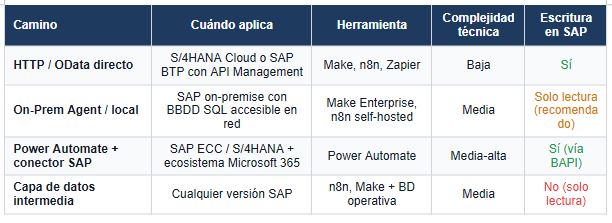
This article explains what technically happens when you try to connect a generic iPaaS platform with an SAP ERP, what are the four alternative paths that companies use in practice and in which cases each one is the right answer.
Why is the direct connection not so direct
Modern automation tools such as Make, n8n or Zapier work by connecting applications through REST APIs or webhooks. The model is simple: the tool calls an endpoint of application A, obtains data, transforms it and sends it to an endpoint of application B.
For this to work, applications A and B must expose endpoints accessible from the internet (or from a network with authorized access), with standard authentication (OAuth2, API key, token).
SAP ERP —especially in its on-premise ECC and S/4HANA versions—does not work this way by default. [1] Its traditional integration architecture is based on RFC (Remote Function Calls) and BAPI (Business Application Programming Interfaces), SAP's proprietary protocols that are not REST. For an external system to call an SAP BAPI, it needs the SAP .NET Connector, the SAP Java Connector, or middleware that translates between the REST protocol and the RFC protocol.
SAP S/4HANA Cloud includes OData APIs (REST-based) exposed natively, which are directly consumable by iPaaS platforms. But S/4HANA Cloud is the most recent version and the one with the least medium-sized Spanish SMEs in place. The majority of the fleet installed in medium-sized Spanish companies are ECC or SAP Business One versions, where the REST API is not available by default.
Prior diagnosis
Rule of thumb before evaluating any integration with SAP: the first question is not what tool to use, but what version of SAP the company has and if any REST API or OData service is exposed. The answer to that question determines if the integration is direct, requires middleware, or requires a local agent.
The four paths that companies use in practice
Way 1. Direct HTTP if SAP exposes OData or REST APIs (S/4HANA Cloud or BTP)
If the company has SAP S/4HANA Cloud or has implemented SAP Integration Suite with API Management on SAP BTP (Business Technology Platform), SAP services are exposed as consumable OData APIs via REST. [9]
In this case, both Make and n8n can connect using their generic HTTP modules: the URL of the SAP endpoint, the authentication (OAuth2 with SAP XSUAA) and the payload structure are configured. It doesn't require a native connector: it's a standard HTTP call.
This is the technically cleanest path, but the least common in medium-sized Spanish companies today. S/4HANA Cloud has a migration and licensing cost that many mid-sized companies haven't yet assumed. SAP BTP with Integration Suite adds another level of license cost.
Way 2. Make On-Prem Agent or self-hosted n8n local access
For on-premise SAP installations that have an SQL database accessible on the local network (SAP HANA, SQL Server for Business One), Make's On-Prem Agent or a self-hosted instance of n8n within the corporate network can connect directly to the database. [6]
This approach allows reading SAP data through SQL queries, although with important limitations: only direct table reading (without using SAP business logic such as BAPIs), greater risk of inconsistency if data is written directly without going through such logic, and the need for technical knowledge of the SAP database structure (which is not trivial).
It's a viable path for read-only use cases—extracting data from SAP to send it to a dashboard or CRM—but not recommended for bidirectional writing without prior detailed technical analysis.
Way 3. Power Automate with the native SAP ERP connector (Microsoft ecosystem)
Microsoft Power Automate has a certified native connector for SAP ERP that operates via RFC/BAPI through the On-Premises Data Gateway. [2] [3]
It requires the SAP .NET Connector 3.0 installed on the server where the Gateway runs and allows read and write operations on the SAP ECC and S/4HANA BAPI functions. It is the most technically robust path for bidirectional integration with SAP in on-premise versions and the one with the most documented cases in enterprise environments.
BeOne Solutions documents a real case of managing invoices and orders in SAP Business One with Power Automate and AI Builder, with a reported reduction of “tens of man-days per month” in manual work. [4] Campana & Schott implemented CS Connect as middleware between Power Platform and SAP, with integrations in PS, CO, CATS and HCM modules. [7]
The limitation of this path is the dependence on the Microsoft ecosystem: it works well if the company already has Microsoft 365 and Power Platform licensed. Otherwise, adding Power Automate specifically for SAP integration can have a license cost that is difficult to justify if there are only one or two flows to automate.
Way 4. Reframing the problem: automating what's outside of SAP
This is the path that least appears in technical comparisons, but the one that solves the most problems in practice. Many of the processes that companies want to integrate with SAP do not require direct access to the ERP: they require that the ERP data be available in another system and that the flows operate on that system.
Vodafone implemented a threat intelligence pipeline with n8n that saves £2.2 million annually. [8] It does not connect directly to SAP: it orchestrates flows on data that is already outside the ERP in accessible formats.
Integration occurs at the data layer—extracting information from SAP into a data lake or an accessible operational database—and the automations operate on that intermediate layer. The functional result is equivalent; the technical complexity is significantly lower.
The N8n—SAP partnership in 2025: what changes and what doesn't
In 2025, n8n announced a partnership agreement with SAP that includes certified connectors for SAP S/4HANA via REST API (SAP BTP OData services). [5]
This is a relevant development that reduces technical friction for companies with active SAP BTP. What doesn't change is the starting condition: for these connectors to work, the customer needs to have SAP S/4HANA Cloud or SAP BTP with the OData services configured and exposed.
For the installed fleet of SAP ECC and Business One on-premise in medium-sized Spanish companies, the n8n-SAP partnership does not eliminate the need for middleware.
The market direction is clear: SAP is migrating its installed base to S/4HANA Cloud and BTP, and iPaaS manufacturers are investing in certified connectors for that architecture. For companies that are already in S/4HANA Cloud, integration with tools such as n8n or Make will be progressively more accessible.
For those who are still operating in ECC or Business One, the path goes through one of the four scenarios described above.
The Right Question Before Evaluating Any ERP Integration
51% of companies recognize that integration issues prevent them from taking advantage of their data. [11]
Most of these companies know that they want to integrate their ERP with some other system. What few have answered precisely is: what specific process needs that integration, what data should it move, in what direction and how often?
An SAP—CRM integration for synchronizing orders in real time has completely different technical and business requirements than an SAP—BI integration for extracting financial data once a day. The first requires bidirectional writing and low latency. The second can be solved with a nightly extraction to an intermediate database accessible by the BI tool. Stated as “I want to integrate SAP with X”, both seem to have the same problem. They are not.
The correct diagnosis defines the process, data, flow direction and required latency before evaluating the technical architecture. With that information on the table, the choice between the four paths described in this article boils down to two or three viable options, and the final decision depends on the existing technological ecosystem, the budget and the technical profile of the team. Without that diagnosis, the conversation about tools is premature.
Forrester documents a three-year ROI of 248 percent for organizations that implement automation correctly. [10] The adverb matters. The automation of an ill-defined integration process does not generate ROI: it generates a production flow that seems to work until it encounters an exception that no one contemplated.
References
1. Zlanyk Technologies. (2025). Can SAP Be Automated Using Make.com or n8n? https://www.zlanyk.com/truth-about-sap-automation/ — Independent technical analysis of direct connection limitations between generic iPaaS platforms (Make, n8n, Zapier) and SAP ERP when there is no exposed REST API. The authors describe the four alternative scenarios: HTTP with RFC/BAPI modules, On-Premagent, desktop RPA, and dedicated middleware.
2. Microsoft Learn. (2024). SAP and Power Platform Fundamentals. Azure Cloud Adoption Framework. https://learn.microsoft.com/en-us/azure/cloud-adoption-framework/scenarios/sap/sap-power-platform-fundamental — Official Microsoft documentation on the integration architecture between SAP and Power Platform. Describes the native SAP ERP connector for Power Automate (RFC/BAPI), the On-Premises Data Gateway, and validated enterprise use cases.
3. Microsoft Learn. (2024). SAP ERP Connector for Power Automate and Power Apps.Power Platform Release Plan. https://learn.microsoft.com/en-us/power-platform-release-plan/2021wave1/data-integration/sap-erp-connector-power-automate-power-apps — The SAP ERP connector for Power Automate allows reading and writing operations on SAP ECC and S/4HANA BAPI/RFC tables and functions. It requires the SAP .NET Connector 3.0 installed on the On-Premises Data Gateway server.
4. BeOne Solutions. (2025). Enhance SAP & Microsoft ERP with PowerPlatform. https://www.beonesolutions.com/insights/blog/sap-microsoft-erp-power-platform/ — Documented case of implementing invoice and order management in SAP Business One with Power Automate and AI Builder. The customer reports a reduction of “tens of man-days per month” in manual reconciliation work between systems.
5. N8nBlog. (2025). n8n and SAP Partnership. n8n.io — Official announcement of the partnership agreement between n8n and SAP in 2025. The partnership includes certified connectors and integration documentation for SAP S/4HANA via REST API (SAP or Data services), available to SAP BTP (Business Technology Platform) customers.
6. Make (2026). Enterprise — On-Prem Agent. https://www.make.com/en/enterprise — Make's On-Prem Agent is an installable component within the corporate network that allows Make scenarios to access local systems (databases, internal APIs, legacy systems) without exposing external ports or modifying corporate firewall rules.
7. Campana& Schott. (2024). Integration of Power Platform and SAP Made Easy. https://www.campana-schott.com/us/company/media-events/detail/integration-of-power-platform-and-sap-made-easy — Real case of implementing CS Connect as middleware between Microsoft Power Platform and SAP, with documented integrations of PS (Project System), CO (Controlling), CATS (Cross-Application Time Sheet) and HCM (Human Capital Management) modules.
8. Vodafone/ n8n. (2025). Vodafone saves £2.2M with n8n threat intelligence pipeline. n8n Blog. https://blog.n8n.io/vodafone/ — Case documented by n8n: Vodafone implemented a cybersecurity threat intelligence pipeline using n8n as an orchestrator. The savings of £2.2M correspond to the automation of the threat analysis and response process, not to direct integration with ERP. The case illustrates n8n's ability to orchestrate complex flows in enterprise environments without the need for direct connectivity to SAP systems.
9. SAP. (2024). SAP Integration Suite — API Management. SAP Help Portal. https://help.sap.com/docs/integration-suite — SAP Integration Suite is SAP's official integration platform, which includes API Management, Event Mesh, Integration Flows and certified connectors. It is the official way to expose SAP services as REST APIs that can be consumed by third-party tools. The license cost starts at the enterprise level and requires an implementation project.
10. Forrester Research. (2024). The Total Economic Impact™ Of Microsoft PowerAutomate. Forrester Consulting, commissioned by Microsoft. https://tei.forrester.com/go/microsoft/powerautomatetei/index.html —ROI of 248% over three years for organizations that successfully implement PowerAutomate. The study includes use cases of process automation on SAP and Dynamics 365 as those with the greatest impact.
11. AppsConnect. (2026). 30+ Enterprise Integration Statistics & Trends for 2026. https://www.appseconnect.com/post_articles/enterprise-integration-statistics-trends-you-need-to-know-in-2026/ — 51% of companies recognize that integration issues prevent them from taking advantage of their data. The 99% face data complexity challenges. ERP-CRM integration is the most in-demand use case.
Heading
Lorem ipsum dolor sit amet, consectetur adipiscing elit. Suspendisse varius enim in eros elementum tristique. Duis cursus, mi quis viverra ornare, eros dolor interdum nulla, ut commodo diam libero vitae erat. Aenean faucibus nibh et justo cursus id rutrum lorem imperdiet. Nunc ut sem vitae risus tristique posuere.

Artículos destacados
Explora nuestros últimos artículos y tendencias.